1
One source of truth
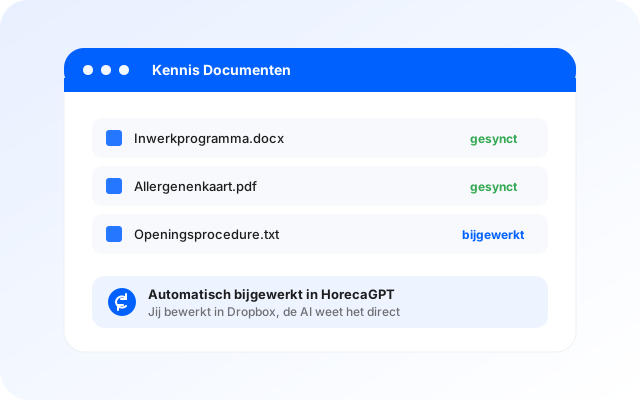
You edit the document in Dropbox as usual. HorecaGPT picks up the change and updates the knowledge. No second place to maintain.
 HorecaGPTThe AI brain that knows all your numbers.
 TableFlowBookings, gift cards, reviews, sales and marketing.
 KitchenOpsRecipes, costings, invoices and HACCP.
 Guest POSThe cloud POS for restaurants, cafés and events.
 HostCrewRotas, clocking in, hours and HR.
 TheNextReviewGuest feedback before it goes online.
You already write everything down. The problem is finding it again. Connect your Dropbox and everything in it becomes knowledge your team can simply ask questions about.
 ×
×Your Dropbox probably already holds it all: the onboarding programme, the allergen sheet, the opening procedure, the house rules. But nobody reads a folder of 200 files during service.
HorecaGPT reads the folders you point it at and turns them into searchable knowledge. Your team just asks a question and gets the answer, with the source attached. You keep managing where you always did.
You edit the document in Dropbox as usual. HorecaGPT picks up the change and updates the knowledge. No second place to maintain.
Nobody needs to know which folder something lives in. Asking is enough, and the answer points back to the file it came from.
You decide per folder which roles get access. What is management-only stays management-only, including in the AI's answers.
Every file from Dropbox carries the Dropbox icon and links straight through to the original. Per source you see how many files were read and when it was last updated.
Your team asks about a procedure, an allergen or an agreement and gets the answer from your own documents, in the language the question was asked. Each answer shows the file it came from.
No. You select the folders or files that are included. Everything else stays out of view.
The integration checks for changes regularly and updates the knowledge automatically. You never re-upload anything.
Only if you enable it per source. By default the integration is read-only: Dropbox stays the source of truth. With write-back on, an approved AI edit is saved as a new version.
Per folder you set which roles have access. Staff without that role never see the content, not even indirectly through the chat.
Yes. Scanned PDFs are read using text recognition, so even old handbooks become searchable.
In a 15-minute demo we connect a folder and you ask your first question straight away.
Dropbox and the Dropbox logo are trademarks of Dropbox, Inc. HorecaGPT is not affiliated with or sponsored by Dropbox, Inc.; the logo is shown only to identify the integration with Dropbox.