1
Real food cost per dish
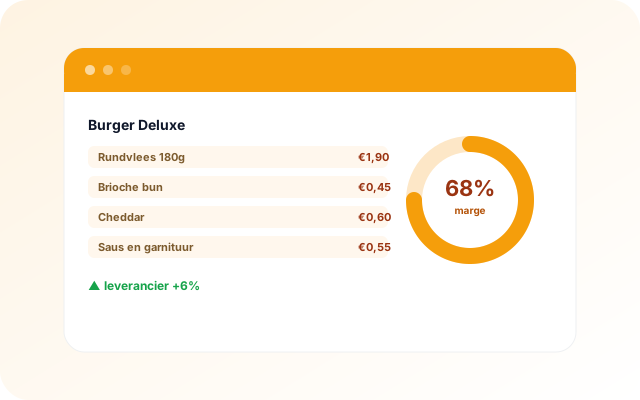
By linking KitchenOps cost prices to your unTill sales, HorecaGPT calculates the real margin per dish, not on paper, but based on what you sold.

 HorecaGPTThe AI brain that knows all your numbers.
 TableFlowBookings, gift cards, reviews, sales and marketing.
 KitchenOpsRecipes, costings, invoices and HACCP.
 Guest POSThe cloud POS for restaurants, cafés and events.
 HostCrewRotas, clocking in, hours and HR.
 TheNextReviewGuest feedback before it goes online.
KitchenOps turns a recipe into a cost price in under 30 seconds and reads invoices automatically. Connected to HorecaGPT, that becomes the basis for advice on food cost and margins.

 ×
×KitchenOps calculates cost prices, reads supplier invoices automatically and flags quiet price rises, often before the supplier announces them. HorecaGPT combines those cost prices with your sales from unTill into a real food cost per dish.
Which dish actually earns and which best-seller barely makes any margin? HorecaGPT lines up recipe, purchasing and sales and tells you where you leave money on the table.
By linking KitchenOps cost prices to your unTill sales, HorecaGPT calculates the real margin per dish, not on paper, but based on what you sold.
HorecaGPT flags when a supplier creeps up in price, so you can negotiate or adjust your menu.
Combine margin and popularity and see which dishes to push, revise or drop.
Food cost, margins and purchasing trends from KitchenOps appear next to your revenue and labour cost, so you see the full picture of profitability per venue.
Ask about your cost prices, your margins or your purchasing. The assistant pulls it from KitchenOps and links it to your sales data for a complete answer.
The connection is read-only and works per venue. HorecaGPT reads your recipes, cost prices and purchasing data without changing anything in KitchenOps.
Yes. KitchenOps reads supplier invoices automatically; HorecaGPT uses that data to interpret price trends and margins.
The real margin: HorecaGPT links the KitchenOps cost price to your actual unTill sales per dish.
Connect KitchenOps to HorecaGPT and steer on real margins instead of assumptions.